
Less Paperwork, More Leadership: AI for Administrative Efficiency
Written by: Ryan Murray
Between bus duty, responding to the parent who is furious that it rained at recess, and finalizing your 47th teacher evaluation of the month, building administrators in Indiana are constantly fighting a losing battle against the clock. If someone told you there was a way to safely reclaim five hours a week, you may ask what the catch is. While the media loves to panic over students using ChatGPT to fake their Great Gatsby essays, we are completely missing the technology’s most practical application. This isn’t just a cheating hazard. For tired, overworked school leaders, it’s the administrative assistant you desperately need but don’t have the budget to hire.

The hardest part of school leadership is the tug-of-war between wanting to be a visible instructional leader and actually being a glorified desk jockey. We all want to be in classrooms supporting our teachers. Yet, the reality of the blank screen keeps us chained to our dual monitors. Whether you need to draft a tricky memo explaining yet another change to the cell phone policy or formulate a meaningful professional development agenda, getting the first few sentences down is pure agony. In my recent work helping Indiana districts navigate this tech, my biggest piece of advice is a fundamental workflow shift: stop creating first drafts from scratch. Move to editing drafts generated by a computer. Let the machine do the heavy lifting so you can get back out into the hallways where you belong.
“Let the machine do the heavy lifting so you can get back out into the hallways where you belong.”
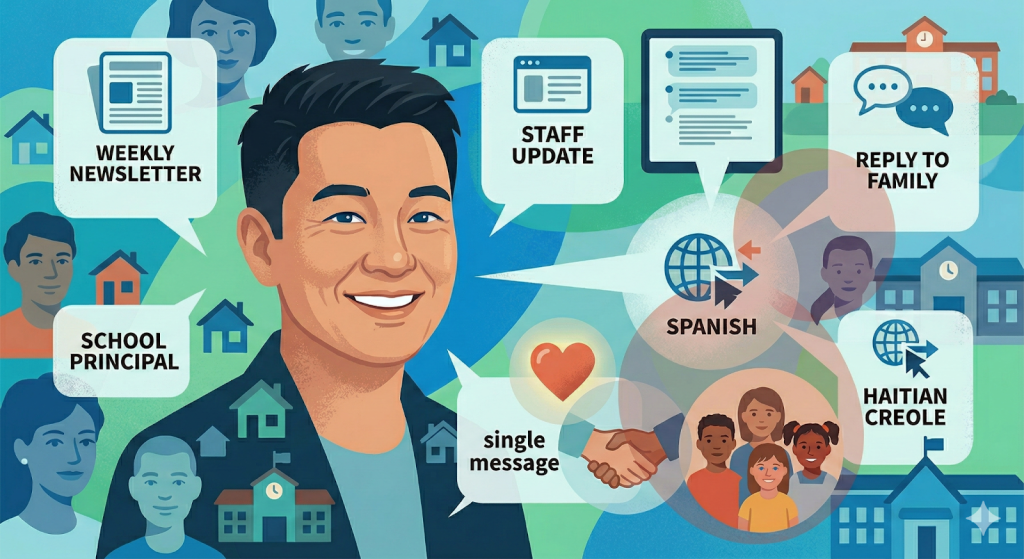
Think about the absurd amount of writing required of a building leader every single week. Between the Friday community newsletter, urgent staff updates, and routine replies to families, you’re practically a full-time PR manager. Instead of staring blankly at your keyboard at 4:30 PM on a Friday, try feeding a chatbot a quick, poorly-spelled list of facts. Throw in the upcoming ILEARN testing schedule, the persistent need to develop a theme day for some occasion, and a gentle reminder that the morning carline is not a NASCAR track. In seconds, you get a warm, professionally formatted newsletter. You can even ask it to translate that text into Spanish or Haitian Creole immediately. Suddenly, you’re reaching all the families in your community without waiting for district translation services.
Then there are the emails that test your sanity. You know the ones. A parent writes a three-paragraph complaint about a locker dispute, and your instinct is to fire back a response that would definitely end up on the superintendent’s desk. Instead of letting it sit in your drafts folder while you cool off, you can drop the parent’s email into an AI tool (again, removing names first) and prompt it with: “Draft a polite, empathetic, and firm response outlining our student handbook policy on locker usage.” The output is usually the level-headed, professional response you didn’t have the emotional energy to write yourself. It enforces the boundary while keeping your blood pressure stable.
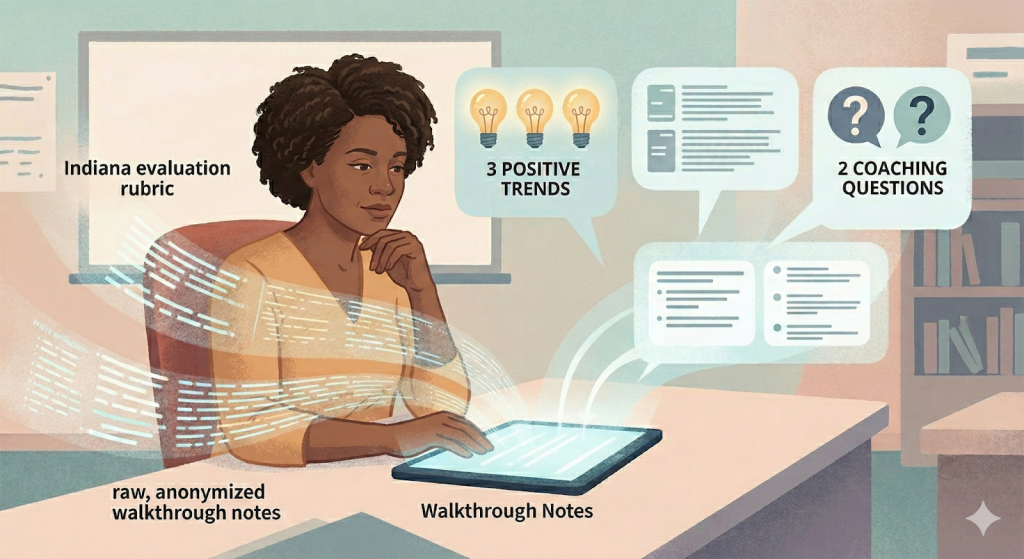
This tech is also a lifesaver when processing observations and staff feedback. But let me be clear, because I preach this in every single workshop I lead: NEVER put Personally Identifiable Information (PII), student data, or specific teacher names into a public system. Seriously, don’t do it. But once you strip away the identifying details? It becomes a fantastic thought partner. We regularly show principals how to drop their raw, messy, anonymized walkthrough notes into a prompt box and ask for three positive instructional trends and two coaching questions aligned with the Indiana evaluation rubric. It takes your scattered thoughts and turns them into focused instructional coaching. Honestly, it makes you look like a genius who definitely didn’t just chug three cups of coffee to survive the afternoon block.
We’ve all felt the absolute joy of a dense, 40-page memo dropping from the IDOE regarding new literacy mandates or graduation pathways. Instead of spending your Sunday afternoon deciphering it, you can drop the PDF into a tool that summarizes the document, extracts the key deadlines, and drafts a one-page briefing for your instructional coaches. The same goes for meeting prep. If you are staring down an upcoming staff meeting, ask for an interactive, 45-minute agenda focused on chronic absenteeism, complete with discussion prompts and time limits for each section. It’s like having an assistant whose only job is to prep your meetings.
Embracing this stuff in the front office is simply about working smarter. The only real catch is that you have to keep the human in the loop. The software is incredibly fast, but it has zero localized context, lacks empathy, and doesn’t know the specific, sometimes chaotic relationship history you have with your community. It might occasionally make up a fact or produce a tone that feels too corporate for a midwestern middle school. Your job is to be the final editor, ensuring every word aligns with your building’s culture. It’s a highly capable assistant, but you are still the principal. And trust me, no robot is ever going to handle bus duty anyway.
Bonus: The Principal’s AI Cheat Sheet
Ready to try it out? Copy and paste these five prompts into your AI tool of choice. Just remember to fill in the bracketed information and never include student or staff names!
- The Friday Newsletter Generator
“Draft a warm, positive Friday newsletter to parents from the principal. Include these three bullet points: [Insert Event 1], [Insert Event 2], and a gentle reminder about [Insert Policy, e.g., the dress code]. Keep the tone upbeat, formatting easy to read with bold headers, and keep it under 300 words. Provide a second copy of this exact newsletter translated into [Insert Language].”
- The Angry Email Diffuser
“Read the following email from a frustrated parent. Draft a polite, empathetic, and professional response that validates their frustration but firmly holds the line on our student handbook policy regarding [Insert Issue]. Keep the tone de-escalating. Do not make any promises. Here is the email: [Copy/paste email without names].”
- The Observation Synthesizer
“I just completed a 15-minute classroom walkthrough. Here are my raw, messy notes: [Paste Anonymized Notes]. Based on these notes, identify three positive instructional trends and suggest two reflective coaching questions I can ask the teacher that align with the Indiana evaluation rubric.”
- The IDOE Memo Decoder
“I need to explain this complex state policy memo to my teaching staff. Summarize the pasted text into a one-page brief. Highlight any immediate deadlines in bold, and bullet out the top three things classroom teachers need to know or do right now to be in compliance. [Paste document text].”
- The Staff Meeting Architect
“Create a 45-minute staff meeting agenda focused on [Insert Topic, e.g., reviewing our new MTSS tiering system]. Include a 5-minute icebreaker that isn’t cheesy, a 15-minute data presentation section, and 20 minutes for small group brainstorming. Provide two specific, thought-provoking discussion questions for the small groups to tackle.”
Resources
Please login or register to claim PGPs.
Alternatively, you may use the PGP Request Form if you prefer to not register an account.