
Using AI to Give Students Feedback
Written by: Lauren Poole,Emily Opell
During the writing process, teachers often find themselves playing some kind of strange game of leapfrog, hopping from one student to the next quickly and frantically to help as many students as possible. You may often find yourself wishing…If only I could clone myself, this would be so much more effective.
We know that one of the tenets of solid instruction is timely, specific, actionable feedback and its application. However, that is where we often fall short as teachers, not because we aren’t giving valuable feedback, but our workloads create a barrier to providing timely feedback. The effectiveness of the feedback declines exponentially with every day that passes, and sometimes, it can take weeks to provide writing feedback!
So, that is exactly the problem we try to solve by using AI in our classrooms. We do not use it as a substitution or replacement for ourselves, but as an extension, tailored to our design, expectations, and objectives to give timely, actionable feedback and opportunities to apply that feedback. The output (feedback for students) when using AI is only as good as the input (my expectations), so it is important that the teacher is still the source DNA, while AI is merely their clone.
In a world dominated by AI usage, many of us find ourselves asking the essential question, “What is an appropriate usage of AI in education?”
From our perspective and experiences, the answer to that question is that AI is a tool, not a replacement for thinking, creativity, or design.
There are programs that exist to make our jobs easier, but we cannot become totally dependent on AI, or we will lose the art of teaching that we have developed over the years.
Therefore, what can AI do for you? In this blog, we will introduce you to several different AI programs that will enhance your instruction and student engagement, deliver quick feedback, organize ideas, and make your life easier.
With the internet at our fingertips, there are endless possibilities of implementing AI programs within the classroom. In this section, we will explore a few of our favorites.
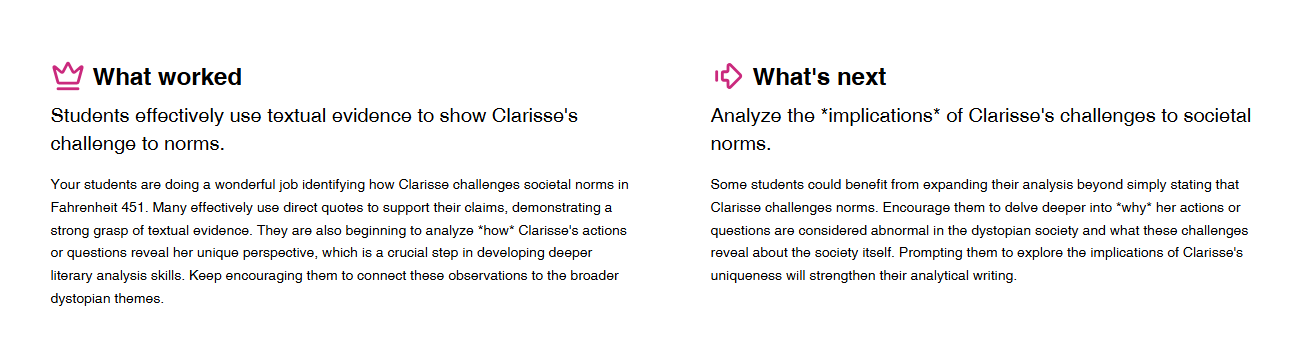
We Will Write: This is an incredible tool in the classroom because it turns quick writes into a competition and also provides instant feedback for individual students and the class as a whole. As a teacher, you can choose a program-created prompt or create your own. After you launch the programs, students are split into teams, and each student types an individual response. It then shifts into game mode, where students provide feedback on their work and the work of others. Ultimately, students vote on a winning response, and one team wins. While the competitive aspect of this tool is engaging for students, the ability to provide instant feedback for both the students and teacher is the biggest win. With 150 students in our classes, that feedback takes hours, or even days, and by the time we are able to offer it, students are no longer invested in the assignment. This eliminates a time issue for all of us. In the following image, you can see what the teacher dashboard looks like after a class finishes an assignment.
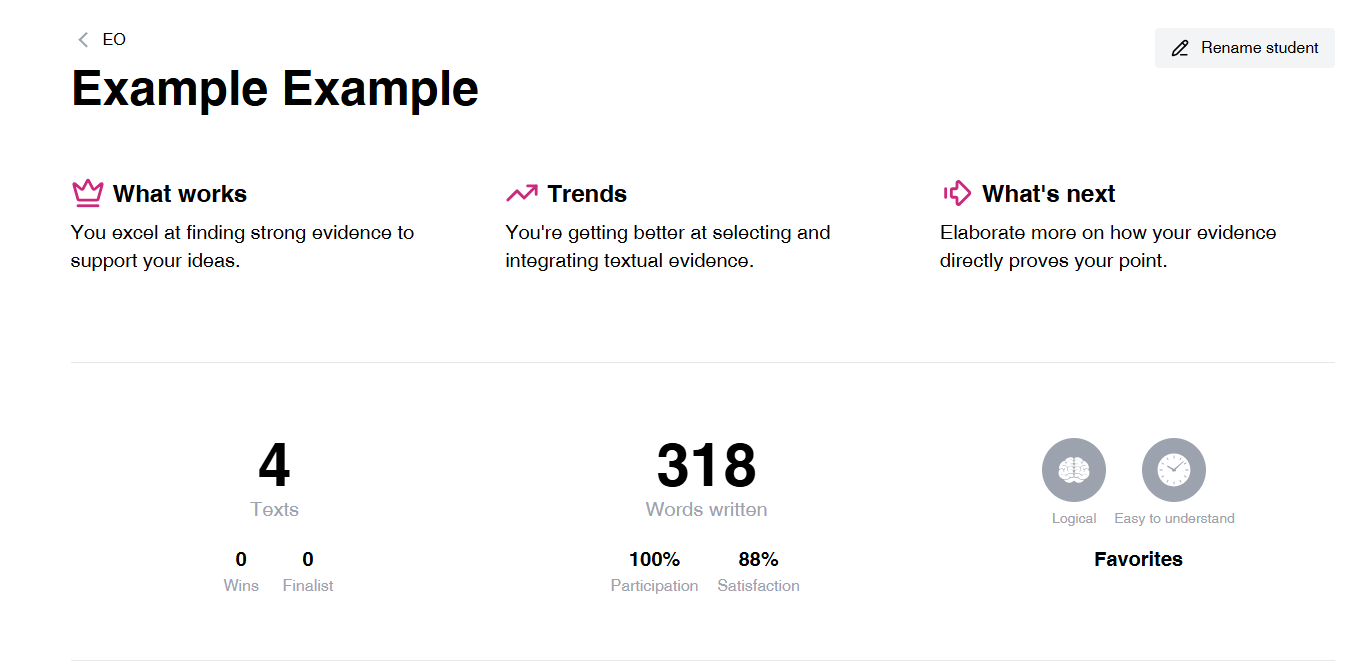
Additionally, after students write several responses, you are able to view individual feedback for each student in their writing portfolios.
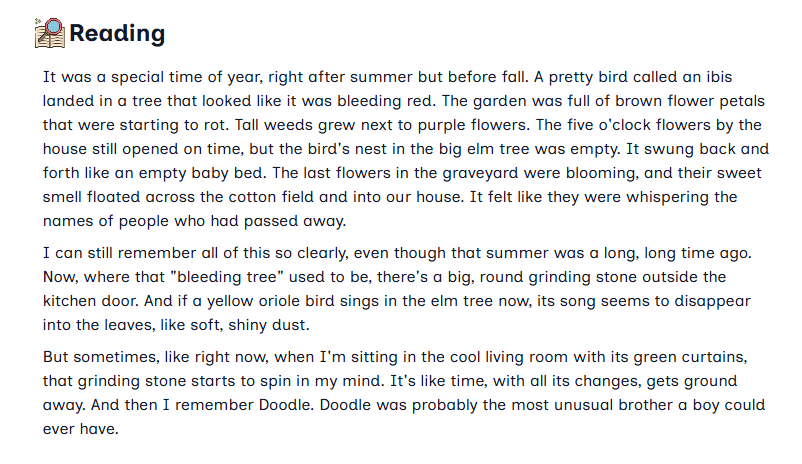
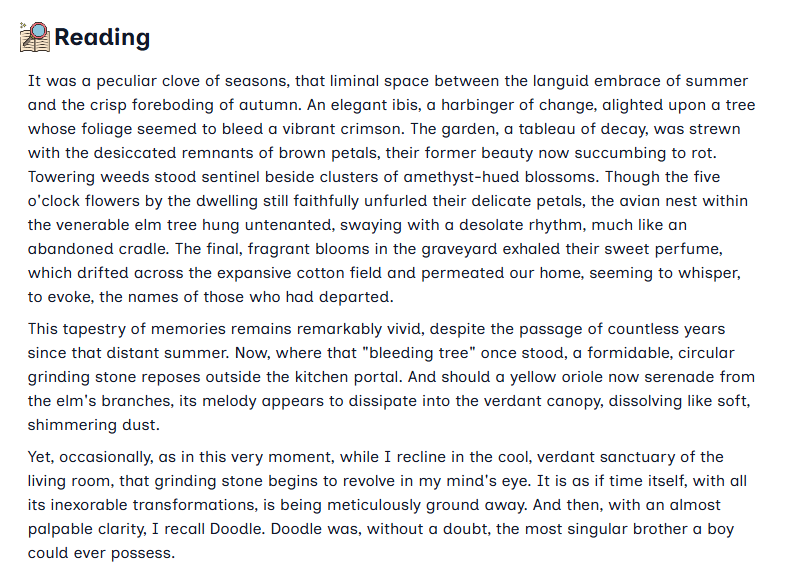
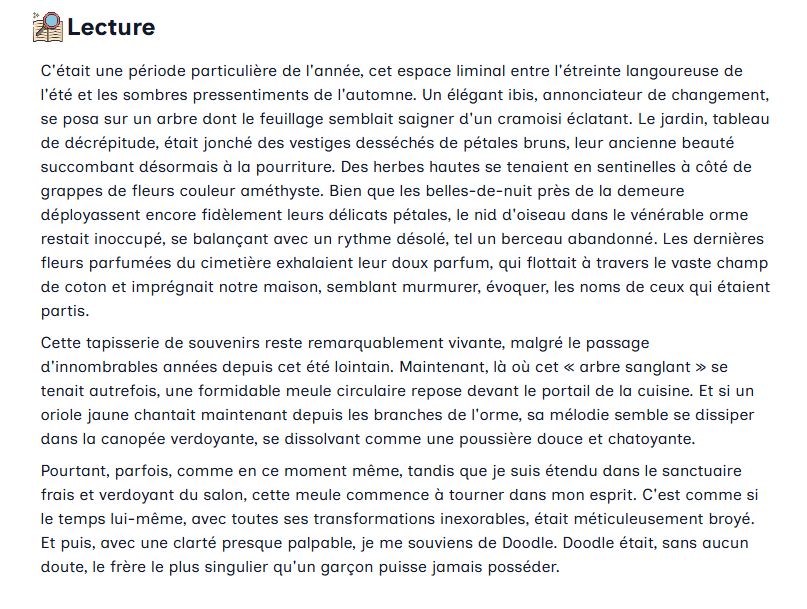
Diffit: As teachers who teach three different levels of the same subject, we are constantly looking for ways to adapt texts to meet the diverse needs of our students. We are given certain texts, but we need those texts for leveled classes such as basic English, integrated English, and advanced/honors English. There are several uses for this program, but a few that stand out to us are the ability to differentiate texts, design graphic organizers/scaffolding resources for both reading and writing, and create test-prep for standardized tests such as the SAT. It is also an excellent way to translate online texts into various languages. The pictures below show how Diffit was able to modify the introduction to “The Scarlet Ibis” for several different reading levels and languages. This then allows students to focus more on the skill application than battling confusion or resentment.
Modified for a lower reading level than the original:
Modified for a higher reading level than the original:
Modified for a different language than the original:
Snorkl: My current favorite AI co-pilot is Snorkl. While I use it for writing feedback in my English classroom, the modes of student input are nearly limitless. Students can demonstrate knowledge through any combination of digital whiteboards, audio responses, images, and text. I’ve seen Social Studies teachers use Snorkl to provide feedback on digital slides students have uploaded, and Math teachers use Snorkl to give students valuable practice and feedback showing and explaining their work.
Instead of just selecting a multiple-choice answer, students can draw, write, or talk through their logic. Since students can speak their reasoning instead of just writing it, Snorkl lowers the barrier for kids who have the ideas but struggle with putting a pen to paper. Plus, it supports over 40 languages! That is certainly something I cannot do on my own!
I’m not the only one who loves Snork, either! Check out this video from Tim Arnold, a Keep Indiana Learning Innovation Coach, for a quick overview.
Think of Snorkl as an assignment or activity that talks back. We often don’t know a student is lost until we have graded their exit ticket. By then, the opportunity for coaching has passed. On a broader level, collecting meaningful, whole-group data has never been more streamlined. Snorkl gives you a class summary of insights that highlights common misconceptions. Instead of grading 30 papers to realize half the class missed Step 2, you know exactly what to address at the start of the next period.
With all of these modalities, students can both explain and prove their knowledge in so many ways, ironically making AI a perfect way to combat students using generative AI to complete their work!
If you’ve ever wished you could sit next to every single student at the exact same time while they struggle through a math problem or a science concept, Snorkl can allow you to do just that. The optional Snorkl Coach Feature is the real game-changer! While students are working, they can ask the AI “Coach” for a hint. This is an option you can turn off or turn on when you create a Snork activity. Snorkl Coach won’t give them the answer, but it acts like a supportive tutor, nudging them back on track so they don’t give up, effectively breaking the “I’m stuck” cycle. The only downside to this feature is that it is Premium; however, the general AI feedback students receive upon submission is just as beneficial in my opinion!
When students submit their attempt, they receive feedback aligned with your expectations, and can immediately start improving and refining their work. You can set up how many times they are allowed to revise upon submission, whether that is two tries or limitless!
Setting up an Activity:
The Snorkl activity library is filled with 1000s of standards-aligned activities sorted by grade level, but creating your own is simple!
To start, under My Library, you will click “Create New”.
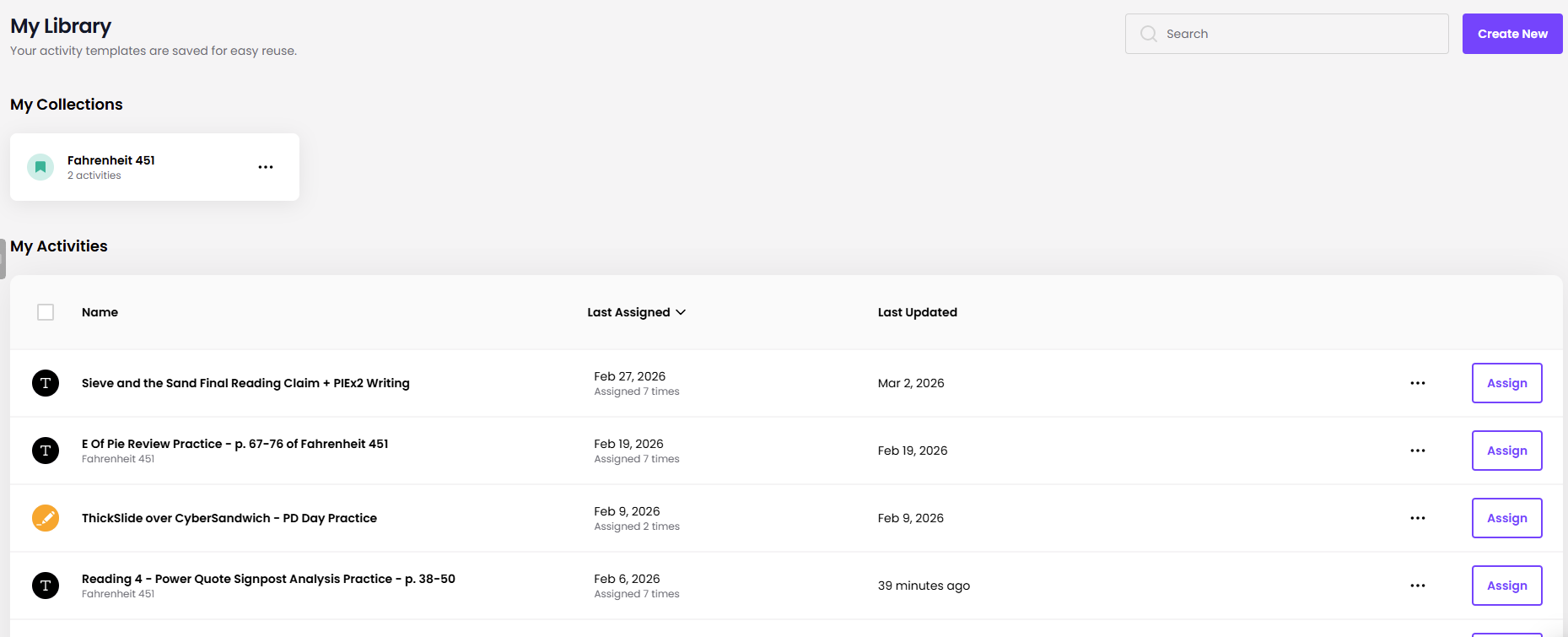
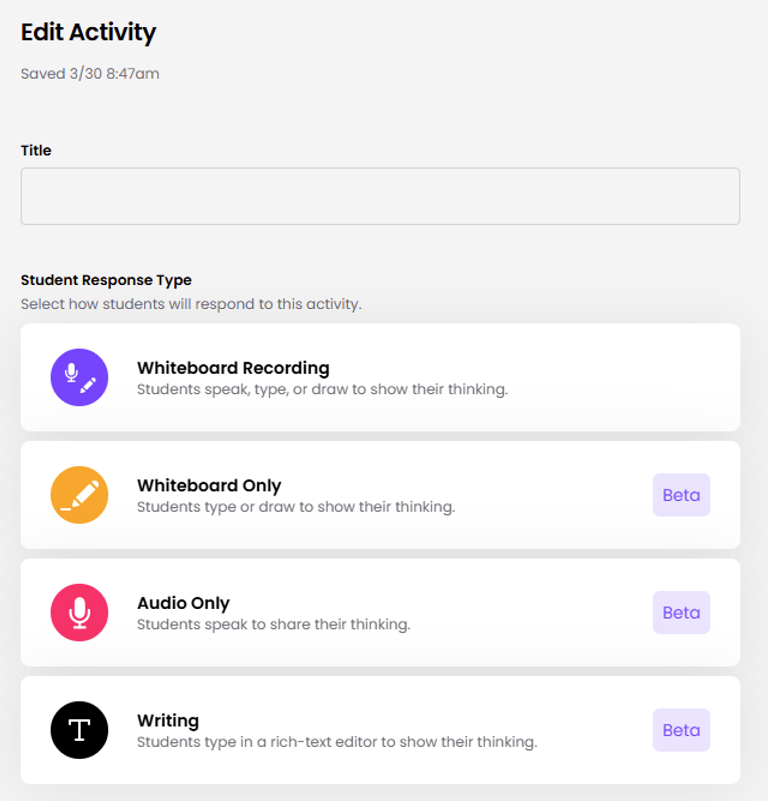
Then, you will choose the input options for students. I primarily use Snork for writing, so I almost always choose text/writing only.
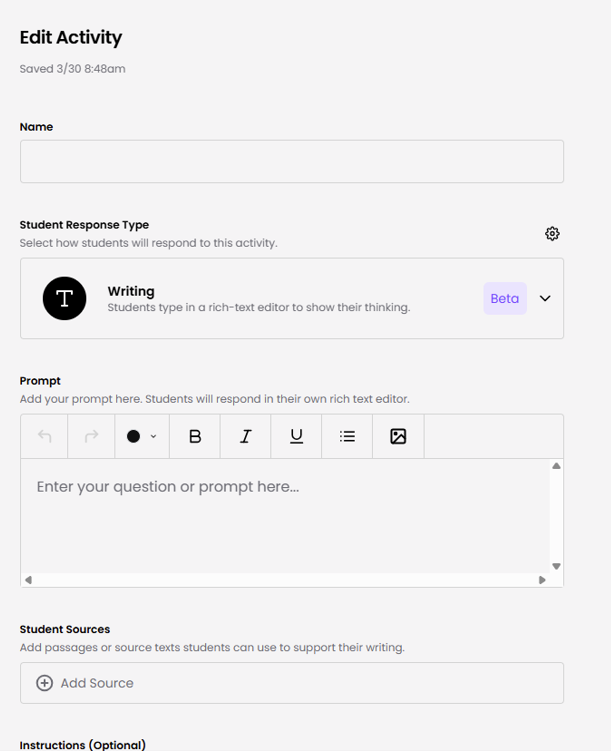
Next, you will set up your prompt. I typically have already prepared this in advance in my lesson plans, so it’s just a matter of copying and pasting. You can add additional resources that students have had access to as well, including rubrics, graphic organizers, source material, and informational anchor charts.
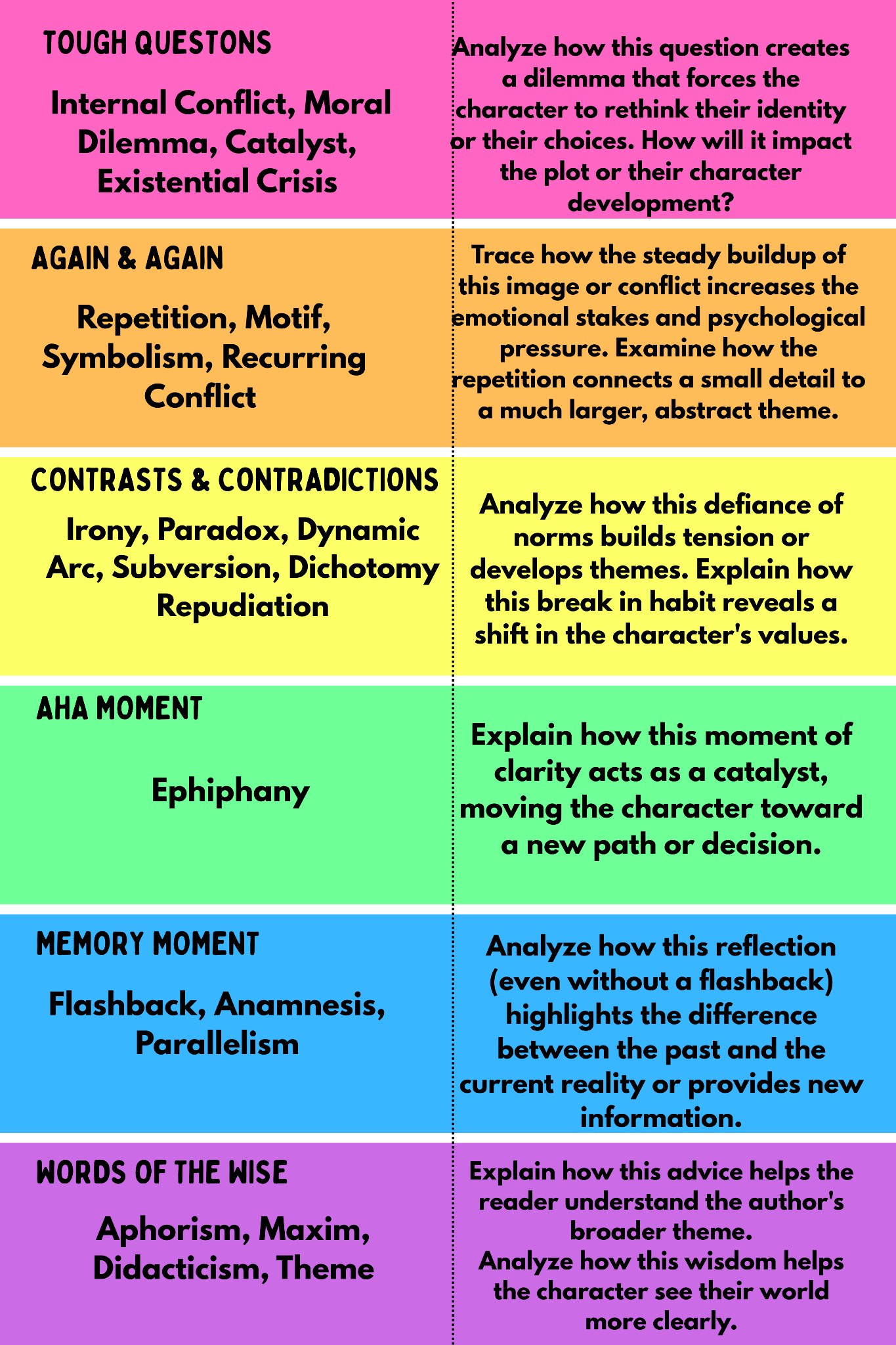
On the first Snork writing activity I set up for my Pre-AP sophomores, students were practicing literary analysis using annotations of key quotes they’d already identified from a specific reading of Fahrenheit 451 based on the Notice and Note Reading Signposts for Fiction. I included a digital image of their signposts bookmark and the following text as my prompt: Provide one of your starred key important power quote examples from this reading. Remember, a power quote can potentially be multiple signposts combined in one, hinting at its overall significance. There are several options to choose from, so of course, there is not one right answer!
Then, use the guidance from the bookmark to analyze and reflect on that power quote signposts example with further consideration. Challenge yourself to use one of the literary terms provided when discussing your power quote, too!
Snorkl will then give you the option to either manually set up the AI feedback or to generate it directly from your prompt (recommended).
This is what Snorkl generated for me based on my materials and prompt:
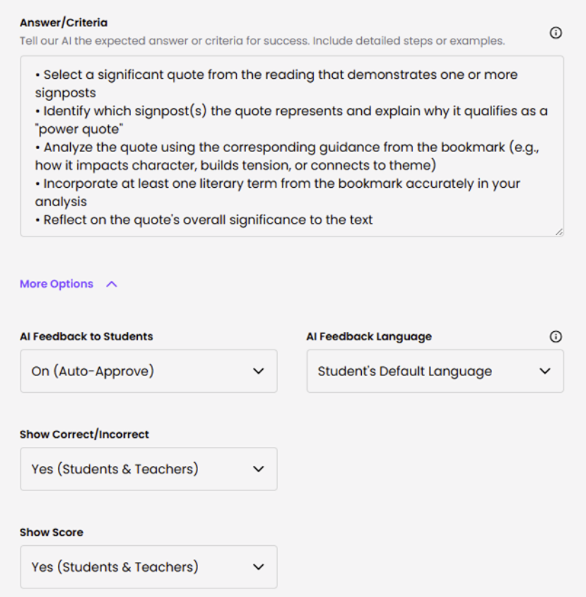
At this point, I can tailor the Answer/Criteria section further and make changes manually aligned to my own expectations. I can also dictate whether or not the students should receive a score or just feedback.
When I assign the Snorkl activity, I can make the following additional adjustments:
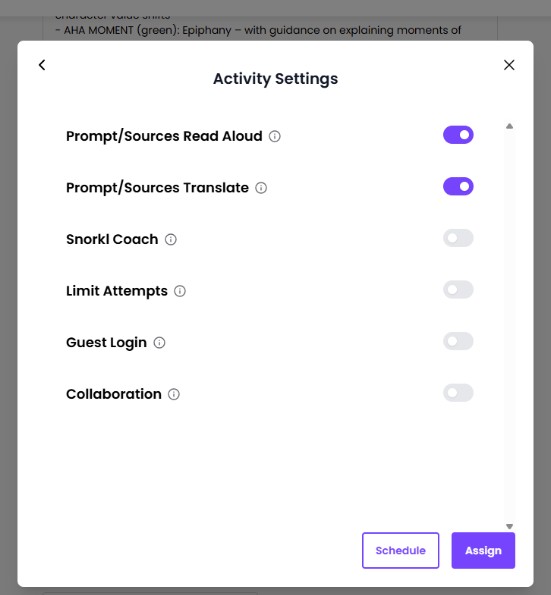
Snorkl Coach will give them prompting as they work in real time, but it is a Premium feature. This is not something I typically use. Submission attempts with AI feedback provided after can be limited to one or as many as 50. Guest login allows students to use the platform without a Google or Microsoft account. Collaboration mode allows students to view peer responses anonymously upon submission.
However, I never assign a Snorkl activity without testing it out for myself in Student Mode. This allows me to see if the feedback students receive is truly aligned with my expectations and to make necessary adjustments in the prompt/feedback sessions.
The “Try As a Student Button” is always visible through the activity creation process.
On my first attempt, I usually put my student thinking cap on and try to write as if I’m one of them. Then, I apply the feedback provided until my response reaches “Excellent”. If I notice trends in feedback that don’t align with my expectations, I go back to the Answer/Criteria and make changes, too.
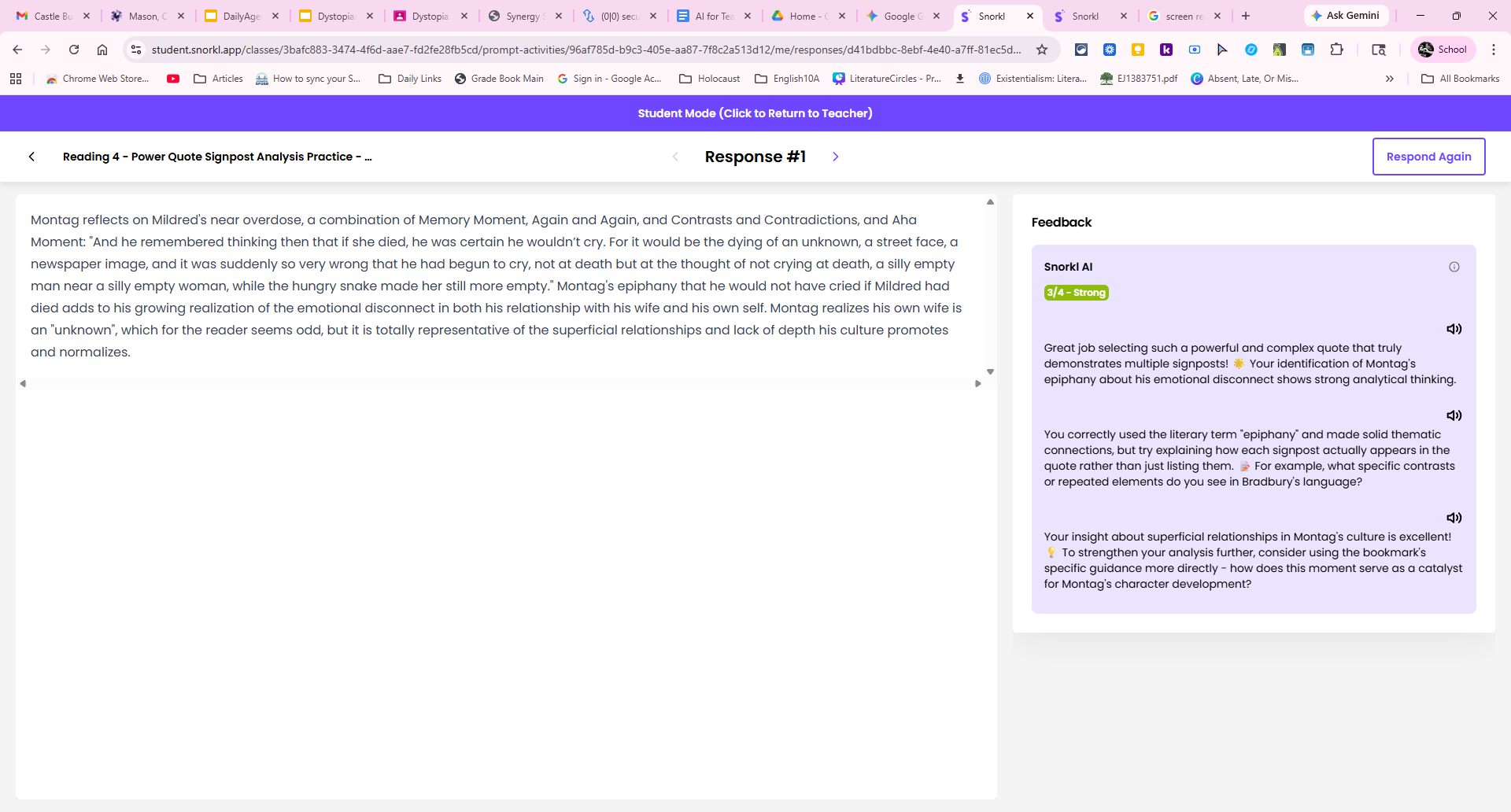
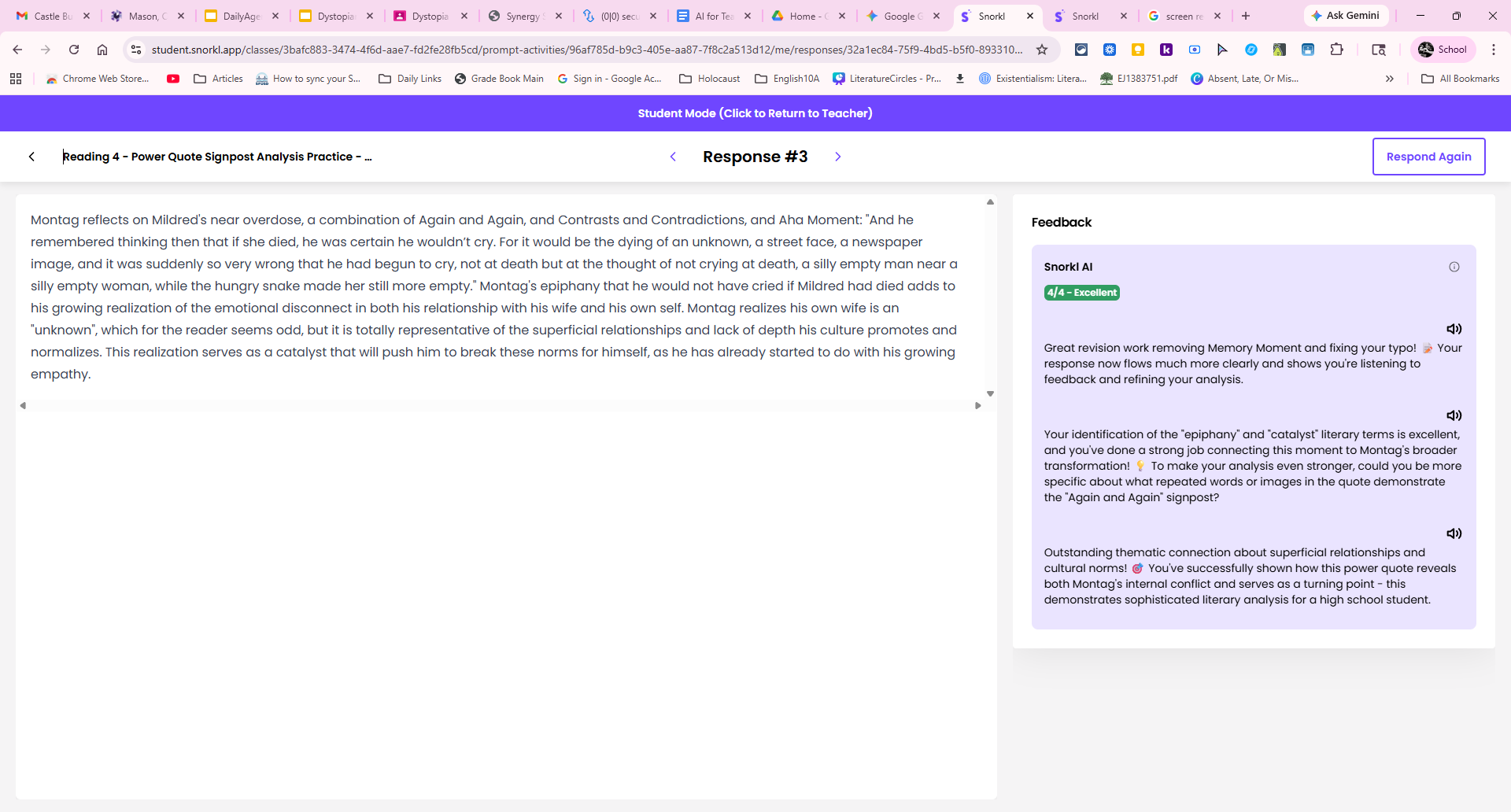
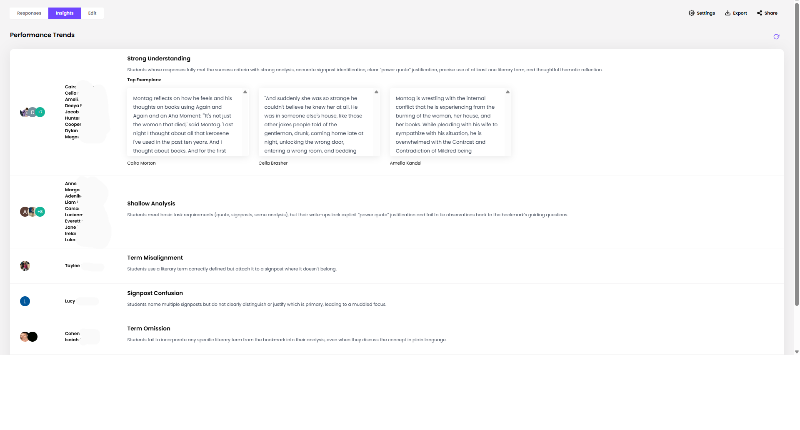
I gave my students a class period to both write and revise, advising them that the goal was to earn an “Excellent” or a “Strong” after their attempts. Then, I was able to look at the performance of the class as a whole to receive insights into strengths and weaknesses, as well as how many attempts each student made and attempts that were flagged due to copying and pasting.
I am continuously impressed with Snorkl, not only because of its ability to provide constructive feedback appropriately and consistently no matter the complexity of writing skills I keep throwing at it, but also seeing students really buy-in to growth mindset and keep working to improve.
ChatGPT: As many of us, I also dread the student use of ChatGPT. However, it is not the tool itself that is the issue as much as the misuse of it. The importance of modeling this tool in class is essential in today’s society. While it is not appropriate for us to ask ChatGPT to develop a lesson, it is a wonderful tool to organize the creative thoughts inside our brains and to save time. Here are a few ways we have utilized this resource in our classroom in appropriate ways:
- While designing a new podcast project for Romeo and Juliet, I dropped all my thoughts into ChatGPT, and it quickly organized the assignment by creating a graphic organizer for students to use.
- While writing a literary-application test for Fahrenheit 451, I found the passages, wrote the questions, and supplied answer choices. I asked ChatGPT to check to make sure the wording and rigor match what students may experience on the SAT and PSAT.
- After reading the funeral speeches in Act 3 of Julius Caesar, I utilized ChatGPT to help create a graphic organizer for students to analyze the rhetorical devices each character uses.
- For dialogue-heavy, yet critical scenes of Fahrenheit 451 and Lord of the Flies, we have taken the PDF pages of that reading and transformed them into reader’s theatre scenes, which has been so helpful for comprehension and engagement
Thoughts to Consider: Some of the programs have limited time during which you are granted premium access. After that time, the free versions may not have as many exciting features, but they are still helpful. As always, make sure to check all AI work for errors. Luckily, we are still smarter than all of these programs!
Resources
Please login or register to claim PGPs.
Alternatively, you may use the PGP Request Form if you prefer to not register an account.